AI agents are genuinely advancing and taking on more and more tasks in our daily lives, and that includes moving past simple typed or voice chat interfaces. Developers and users now expect tools that can not only answer simple questions, but also execute multi-step processes across the apps and websites they already use.
Most current assistants still operate within a single conversation window. They might draft emails, write code, or suggest next steps, but the human user must still action all that output, and complete the work themselves.
Agentic tools like OpenClaw, Hermes, and now SpaceX’s Grok Bot, take on a different approach.
Grok Bot is xAI’s system of persistent AI teammates that run on their own cloud computers. Each Bot can sign into tools, navigate websites, manage files, and carry work through to completion without constant supervision. Grok Bot recently launched to beta users in August 2026.
How Grok Bot Is Different
A standard chatbot or coding agent receives a prompt, generates a response or set of changes, and waits for the next instruction. Grok Bot maintains state across sessions on a dedicated cloud VM that includes a browser, filesystem, and terminal. Because the environment persists, a Bot can remain logged into Salesforce, Gmail, Slack, or internal dashboards and continue working even when the user is offline.
A Computer of Its Own
Each Bot has access to a single, account-based, persistent cloud computer, with one “screen” or workspace per Bot. That single cloud computer can also share files, browser sessions, logins, and command-line credentials to Bots as needed. It can use connectors where available and fall back to direct computer use for applications without clean APIs. That means each Bot can complete work inside real tools that humans use, rather than creating drafts that require manual implementation.
Message It Like a Teammate
Grok Bot’s major selling point is the ease of access for an autonomous agent. Tools like OpenClaw and Hermes require lots of setup, local or rented remote hardware for users, and can break easily. Grok Bot’s setup is simple – you sign up, and then begin messaging your Bots just like a human.
Users can do so from both the Grok Bot desktop app, as well as the iOS app. SpaceX has confirmed than an Android App is coming soon, but given xAI’s history with Android apps, will likely be a late release.
As you send messages, Grok Bot executes. That means that no separate workflow building or generating skills is required. A Bot may request context, relevant files, and a goal. It may also ask for user intervention for passwords and verification codes. With all that in hand, it will report back when it needs approval, needs to relay information back, or has finished its task.
Work With Many Bots at Once
Users commonly run several Bots in parallel. One Bot can act as a coordinator or “Chief of Staff” while others handle specialized lanes such as inbound leads, expense processing, recruiting, or bug reproduction. Bots can message one another, share context in threads or group chats, and hand off ownership without requiring the user to act as intermediary.
Show a Bot How It’s Done
SpaceX is implementing the same type of rapid learning for Grok Bot that Tesla is implementing for Optimus, its humanoid robot. That means teaching a Grok Bot a workflow is as simple as asking it to observe the workflow once.
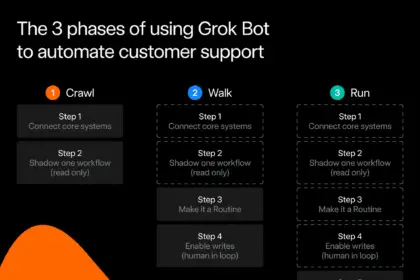
It will record the sequence of actions across various tools or even your browser, save it as a routine, and can then execute that same task on demand, or on a schedule. You can even provide corrective feedback to improve future runs.
Trust Your Bots With More Over Time
Because Bots maintain memory and learn preferences, they become more reliable with continued use. They pick up tone, edge cases, and escalation thresholds. Over time they can also shift from reactive, user-prompted work to proactive follow-up on their own.
How xAI Teams Use Grok Bot
Internally, xAI teams have created Bots for sales outreach and CRM updates, marketing campaign execution, new-hire onboarding logistics, invoice processing, and engineering workflows that include reproducing bugs, filing tickets, and handing fixes to other Bots. The common pattern is that work reaches a finished state inside the target systems rather than stopping at “90 percent complete.”
Who Can Get Grok Bot?
At launch, Grok Bot is available in beta to SuperGrok Plus and Heavy subscribers, as well as eligible Cursor plans (Pro+, Ultra, Teams Standard and Premium) on desktop and iOS.
Enterprise access for teams and companies is available through a waitlist, directly through Cursor’s business portal. Because Grok Bot is contained entirely within the desktop and iOS apps, no separate CLI or browser extension is required or available.
Getting Started
After installing the desktop or iOS app and creating a Bot, users grant the necessary app or website access for the intended work. A good starting ground is to get your first bot to become your Chief of Staff and learn who you are, and what you do.
Once you do that, your Chief Bot can go ahead and create more Bots as needed to hand out tasks. This can be anything from pulling prospects from a CRM, drafting emails, or any number of other tasks.
Plan mode, review checkpoints, and the ability to correct a Bot’s work help maintain both a human touch and oversight on tasks. Because agents like Grok Bot are inherently a probabilistic LLM, ensuring you have a secure approvals, security, and privacy workflow is a good early step as well, especially before you give it access to vital information like your personal emails.
A Practical Step Forward
Grok Bot is xAI’s bet that the next leap in productivity comes from persistent, multi-agent systems, which are capable of using the same tools as humans. Its combination of a shared cloud computer, teammate-style messaging, independent coordination between Bots, and demonstration-based learning make it a genuinely valuable tool that can replace tedious daily tasks and automate your routines.