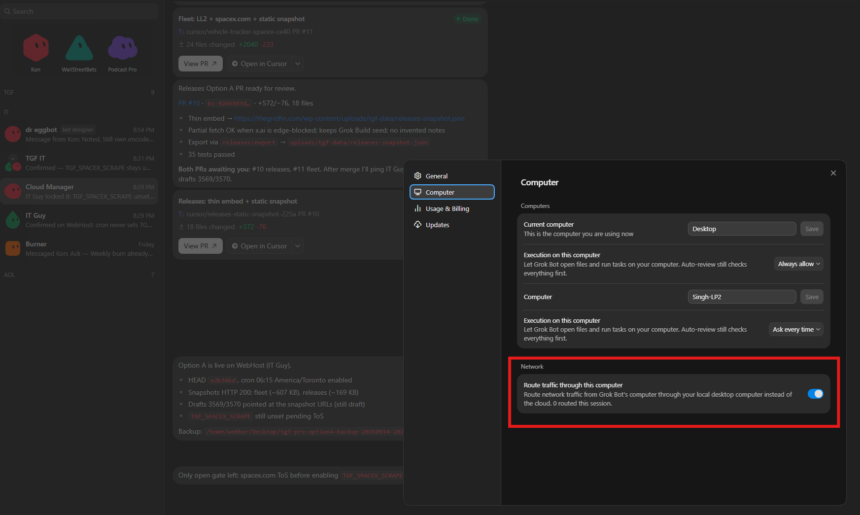
Grok Bot can now send its cloud computer’s web traffic out through your desktop, so destinations see your usual IP instead of the shared datacenter egress many sites treat as bot traffic. The new feature is already live as of 13 September 2026 for most users. You will need to update both your Grok Bot’s computer, as well as your client.
For those whose Grok Bots kept hitting IP blocks, Captchas, or getting logged out of services due to datacenter IPs, this is the solution for you. Your Grok Bot can now just follow the network path directly on your machine, without bolting on a temporary VPN.
This makes it look like the web traffic is coming directly from your home, rather than from generic IP block that belongs to a shared datacenter. In essence, to a normal website or app, it will look like perfectly ordinary traffic. We already expected this feature to launch earlier in August, but this is the official launch of it now.
How to Turn It On
Open Settings → Computer → Egress and enable Route egress through this desktop. Cursor’s Grok Bot settings docs say destinations then see your desktop’s IP address, and the Bot can reach networks available from that device. The desktop has to stay online for the route to work, and you may need to update Grok Bot’s computer as well as your app if the toggle is missing.
Egress for Enterprise
Enterprise admins can shut the path down with Allow Local Egress. When that admin switch is off, the member toggle locks and active routes stop within about five minutes, per the docs. Shared static datacenter egress IPs remain the default when local egress is off. Dedicated per-customer egress IPs are still not available for enterprise organizations, which means tenants must either share the datacenter exit or opt into a member desktop route for the time being.
That means that Desktop Egress remains a per-member path when one person needs access through a network already on their device. Enterprise Team Setup networking clients will remain the path when a team needs a consistent private-network or exit-node connection on every Grok Bot hosted computer. The Security FAQ keeps both options: traffic through a member’s desktop IP, or Enterprise networking clients, with shared static egress as the fallback.
For some users who only stood up a home mesh to dodge datacenter IP blocks on simple browsing, desktop egress may cover that job without a Tailscale- or WireGuard-style hop onto the Agent Computer. This also means that Grok Bot can easily access smart devices or other devices within your home network, so if you host a homelab server, you can more easily use Grok Bot to manage your local services like Home Assistant or JellyFin.