
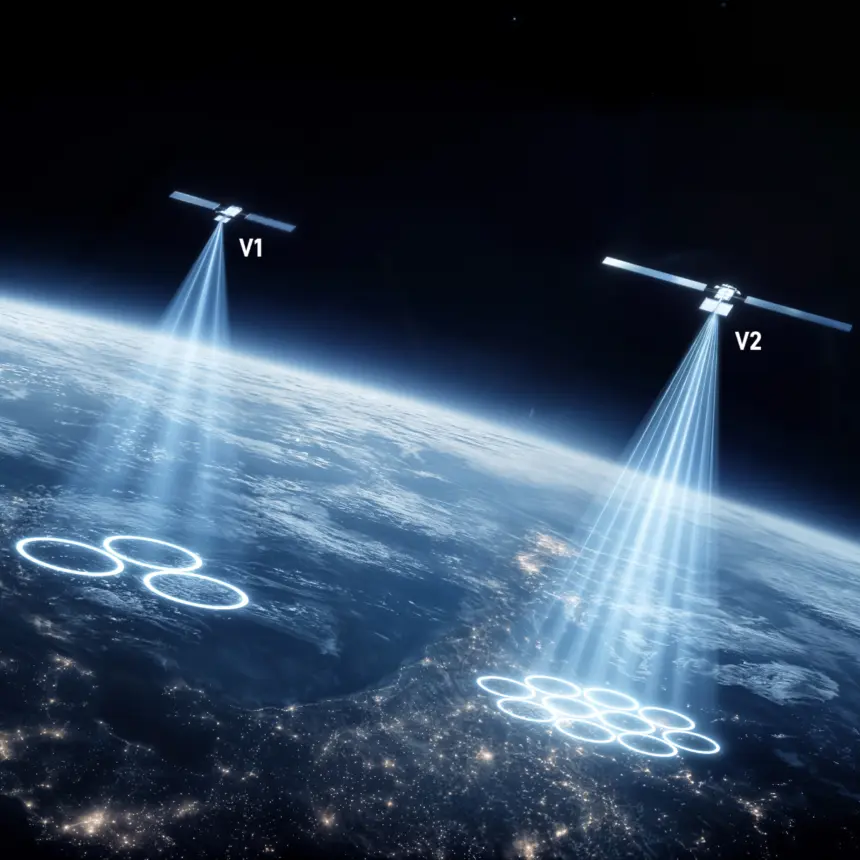
If you use Starlink, the first hop is easy to picture: your dish sends a radio signal to a satellite passing overhead. Every single hop after that gets far more interesting from a technical perspective.
The satellite can send the data down to a nearby gateway connected to the terrestrial internet. But it can also hand the traffic to another Starlink satellite using a laser, then to another, until the network reaches a satellite with a useful route back to Earth.
These are optical inter-satellite links, or ISLs. SpaceX usually calls them “space lasers.” They are one of the technologies that transformed Starlink from a collection of satellites connected mainly through ground stations into a moving network in space.
What is a Laser Link?
A laser link is a wireless data connection that uses light rather than radio waves. A terminal on one satellite points a narrow infrared beam toward an optical terminal on another satellite. Data is encoded onto that beam, received by the other terminal, and passed into the satellite’s networking hardware.
The process is similar to fiber-optic communication, except there is no glass fiber guiding the light. The beam crosses the vacuum between two spacecraft moving thousands of kilometres per hour. Starlink says each V2 Mini satellite has three laser links capable of operating at up to 200 gigabits per second. Its 2025 progress report described a mesh of more than 24,000 lasers.
The newer V3 design improves on that even further. SpaceX says each V3 satellite carries six 400-gigabit laser links, creating redundant routes across what it calls a petabit-scale optical mesh. Those figures describe link capacity and network design, not the speed any one customer should expect at their dish. A laser is shared infrastructure inside the Starlink network, just as a high-capacity fiber trunk carries traffic for many users.
How Does a Laser Hit Another Satellite?
Laser beams are attractive because they are narrow. More of the transmitted energy can be concentrated on a receiver, and optical frequencies offer far more communications bandwidth than conventional radio links. But a narrow beam is unforgiving: if the terminal points slightly off target, the light misses the receiving spacecraft.
Each satellite needs to know where it is, how it is oriented, and where its neighbour will be when the beam arrives. Star trackers help determine the spacecraft’s attitude by observing stars. Orbital data predicts the relative motion of both satellites. The optical terminal then acquires the target, locks onto it, and continually makes tiny pointing corrections.

The two satellites do not remain neighbours forever. Starlink spacecraft orbit Earth in different planes and constantly move relative to the ground and one another. Links must be created, maintained, and released as the geometry changes. The network’s routing software also has to decide which available path makes the most sense for each flow of traffic.
SpaceX’s iterations on the Starlink constellation software have resulted in major improvements over the last few years. Reduced ping loss and more responsive routing have been two of the major improvements for satellite-to-satellite communications, which provide higher peak bandwidth and a more robust connection.
The Route from Dish to Internet
A simplified Starlink connection can follow these steps:
- 1. Your Starlink terminal sends data by radio to a satellite overhead.
- 2. The satellite’s network determines whether to use a ground gateway directly or send the traffic through the laser mesh.
- 3. One or more optical links carry the data between satellites.
- 4. A satellite sends the traffic by radio to a gateway with a connection to the terrestrial internet.
- 5. The response makes the return trip, potentially over a different route as the constellation moves.
Laser links do not replace the user dish, radio antennas, or all ground infrastructure. Starlink still needs gateways and points of presence to exchange traffic with the wider internet. Lasers make the ground segment more flexible because the downlink does not have to be near the customer.
That is especially useful over oceans, polar regions, and sparsely populated land where building gateway stations is difficult or uneconomic. An aircraft or ship can connect to a satellite overhead while its traffic exits the constellation much farther away.
Why Not Use Radios?
Radio-frequency inter-satellite links are possible, but optical links offer several advantages.
First, light can carry very high data rates. The higher frequencies available in the optical spectrum provide substantially more bandwidth than lower-frequency radio systems.
Second, a tightly focused beam directs energy at the intended receiver rather than spreading it broadly. That can support smaller terminals and more efficient power use, although the exact trade-offs depend on the hardware.
Third, space-to-space optical links avoid the biggest weakness of lasers used to communicate with Earth: clouds. The atmosphere can absorb or scatter an optical downlink, but two satellites with a clear line of sight communicate through vacuum.
The trade-off is pointing precision. The satellites must find and track one another while dealing with vibration, orbital motion and changing geometry. The narrow beam is a benefit only after the terminals establish and hold the link.
Do Space Lasers Make Starlink Faster?
Both radio waves and light travel at the speed of light in a vacuum. The difference comes from the route. A laser path can avoid an indirect trip through a distant ground gateway, a terrestrial backhaul, or an undersea cable. Light also travels slightly faster in a vacuum than through glass fiber.
But every satellite hop adds distance and processing. The best route depends on the user’s location, the destination server, gateway availability, congestion, and the constellation’s shape at that moment. For many ordinary connections, a nearby gateway and terrestrial fiber may still be the most efficient path.
A Mesh that Reroutes Itself
In a mesh network, each node can have several possible neighbours. If one link is unavailable, traffic can be sent along another path. Starlink’s satellites and ground network continually recalculate those paths as spacecraft move, links change, and demand shifts around the world.
Redundancy can also help the network route around a local ground problem. A satellite serving an area with damaged terrestrial infrastructure may relay traffic toward a functioning gateway elsewhere. That does not make Starlink immune to outages. The network still depends on the spacecraft and the software, but also on ground-based gateways with power and internet interconnections. That leaves SpaceX with more alternatives than a single ground station that’s damaged or inoperable after a disaster, for example.








![Falcon 9 to Launch SDA Tranche 1 Transport Layer A [Scrubbed]](https://thegridfin.com/wp-content/uploads/2026/07/SpaceX_SLC_4E_01-150x150.jpg)